#FAQ
#How do I modify the value of a configuration item?
coost uses flag to define configuration items, which can be modified through command-line arguments or a configuration file.
On the command line:
-co_sched_num=2 -min_log_level 1
In the configuration file:
co_sched_num = 2
min_log_level = 1
Users do not need to write the configuration file by hand; execute ./exe -mkconf to generate a configuration file.
Alternatively, you can call flag::set_value to modify the default value of a flag:
int main(int argc, char** argv) {
    flag::set_value("co_sched_num", "2");
    flag::set_value("version", "v3.1.4");
    flag::parse(argc, argv);
    return 0;
}
Hereflag::set_valueis called beforeflag::parse, so users can still modify flag values through command-line arguments or the configuration file.
#How do I specify a configuration file at program startup?
The first non-flag argument on the command line (ending with .conf) is the configuration file:
./xx xx.conf
In code, you can use flag::set_config_path to set the default configuration path. After setting it, you do not need to pass the configuration path on the command line:
int main(int argc, char** argv) {
    flag::set_config_path("xx.conf");
    flag::parse(argc, argv);
    return 0;
}
set_config_pathmust be called beforeparse.
#How do I use a flag alias?
When defining a flag, the last parameter can specify at most one alias:
DEF_bool(debug, false, "comment here");    // No alias
DEF_bool(debug, false, "comment here", d); // Alias d
When users cannot modify the flag definition, they can call flag::alias to set an alias. For example, for the flag version defined internally by coost, users can set an alias as follows:
int main(int argc, char** argv) {
    flag::alias("version", "v");
    flag::parse(argc, argv);
    return 0;
}
flag::aliasmust be called beforeflag::parse.
#How do I configure the logging module?
The coost logging component uses flag to define configuration items. Execute ./exe --help to see flag information.
For example, execute the following commands in the coost root directory:
xmake b log
xmake r log --help
You can see the following flag information:
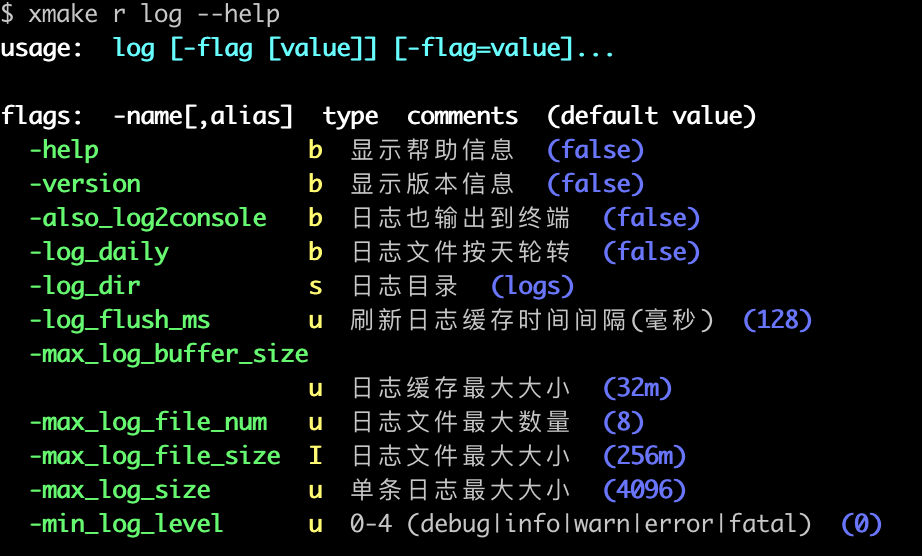
You can modify flag values through the command line or a configuration file to customize logging behavior.
#How do I set the number of decimal places in JSON?
The mdp parameter in the json::any::str() method can specify the maximum number of significant decimal places (default is 16):
co::Json x = {
    {"a", 3.14159},
    {"b", 1.2345e-5},
};
co::print(x.str());   // {"a":3.14159,"b":1.2345e-5}
co::print(x.str(2));  // {"a":3.14,"b":1.23e-5}
#How do I convert between JSON and structs?
coost provides the code generation tool gen, which can automatically generate code for converting between JSON and structs based on a proto file. For detailed usage, see j2s.
#Does frequently creating and destroying threads cause memory leaks?
Frequently creating and destroying threads is a design error.
coost uses TLS (thread-local storage) internally. If threads are frequently created and destroyed, some TLS resources will not be automatically destroyed when the thread exits, resulting in memory leaks.
Although thread_local in the C++ standard can ensure that TLS objects are automatically destructed when a thread exits, destructing TLS objects when a thread exits is not always correct behavior. For example, in a memory allocator implemented based on TLS, when a thread exits, memory allocated in that thread may still be in use by other threads. Releasing that thread’s TLS resources at that time may cause the program to crash.
#How do I set the number of coroutine scheduling threads?
You can configure the number of schedulers through the flag co_sched_num; it cannot exceed the number of system CPU cores.
#Is there a limit on the number of coroutines that can be created?
coost v4.0.0 limits the number of coroutines as follows:
- On 64-bit systems, a single thread supports at most 16M (over 16 million) coroutines.
- On 32-bit systems, a single thread supports at most 1M coroutines.
- The actual allowed number of coroutines is: 16M (1M) * number of scheduling threads.
In practical applications, limited by system memory, the above limits are generally not exceeded.
#Can coroutines experience stack overflow?
coost uses a shared stack design. The default coroutine stack size is 1M, which is large enough that stack overflow generally does not occur. If 1M is not enough, you can adjust it through the flag co_stack_size.
#What are the usage restrictions of the coroutine shared stack?
Within a coroutine, you cannot access objects (local variables) on another coroutine’s stack through pointers or references. The stack is shared, and data on a coroutine stack may be overwritten by other coroutines.
Lambdas need to capture objects on the coroutine stack by value, not by reference.
#How do I use a third-party network library in a coroutine?
coost v4.0.0 removed the hook feature, so third-party network libraries cannot be used directly in coroutines. You can refer to the code in src/co/sock.cc to make a third-party network library coroutine-friendly.
#Can the main thread be set as a coroutine scheduling thread?
This feature would increase the complexity of the coroutine code and is not conducive to maintenance. coost v4.0.0 has removed this feature.